
MINECRAFT. REDEFINED.

FireClient is a Minecraft Java launcher and Fabric in-game client in one install. Manage versions, mods, worlds and packs from one place, then shape your HUD in game. Minecraft, Your Way.

FireClient 1.21.1
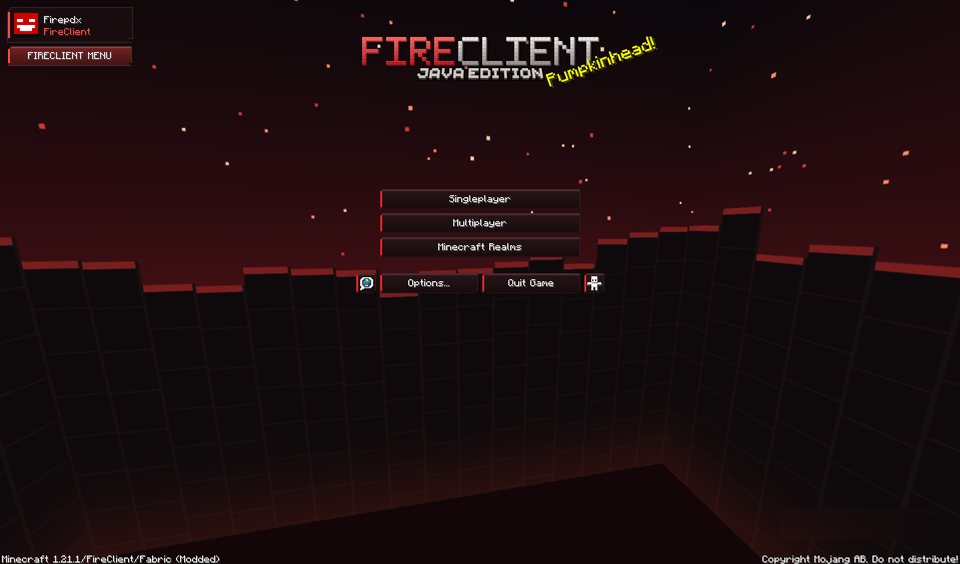
The FireClient main menu in Minecraft 1.21.1 with a red ember sky, the FireClient logo and a FireClient Menu button

The client, as you see it in game.

Open the FireClient menu with Right Shift in any 1.21.1 Fabric world. Pick a view to look closer.

FireClient 1.21.1

FireClient menu on the title screen

A dark red title screen with an ember sky, your profile in the corner and a FireClient Menu button that opens the client settings.

HUD elements

  • Watermark
  • FPS
  • Coordinates
  • Ping
  • Direction
  • Memory
  • Clock
  • Keystrokes
  • Armor
  • Effects
  • CPS

Built around how you play.

Everything here is in the current build. A few things are still planned and listed at the end.

HUD and in-game menu

Press Right Shift to open the menu. Drag HUD elements into place with the HUD editor. Positions, visibility and the sprint toggle are saved to config/fireclient/client.json. Three accent themes are included.

Minecraft 1.21.1 on Fabric, Java 21.

Mods and Modrinth

Discover and install mods, drop in your own jar files, switch installed mods on or off, and install curated packs for Performance, Visuals, Utility and PvP.

Worlds library

Browse local worlds with their own icon, last-saved date and size. Refresh, search and sort.

Memory you control

Choose a memory budget in the launcher. It is passed to Java as the max heap, limited to a safe range.

Your files stay put

The pack library has no delete action, and the installer and uninstaller leave your worlds and resource packs on disk.

Local skins

The launcher keeps an offline skin and the in-game mod applies it as a client-side player texture.

Host a server

Run a Paper server from the launcher. It shows Running once Paper reports ready. Router port forwarding is still up to you.

Other versions

The launcher starts other Minecraft versions too, but the in-game client only exists for 1.21.1 on Fabric.

Planned, not built yet: a crosshair editor and cosmetics.

Get FireClient.

The installer sets up the launcher. You need your own Minecraft Java Edition account to play online.

WindowsWindows 10 / 11 · 64-bit · Installer

Checking release…

Version
—
File size
—
Released
—

Unsigned beta. Windows may show a security prompt. Compare the SHA-256 above with your downloaded file before you run it.

Platforms

  • WindowsChecking…
  • macOSNot available
  • LinuxNot available

Install in five steps

  1. Download the installer and wait for it to finish.
  2. Verify the SHA-256 (optional): Get-FileHash in PowerShell.
  3. Install and accept the terms. Allow the Windows prompt if you trust the source.
  4. Sign in with Microsoft, or use an offline profile.
  5. Play 1.21.1 Fabric to get the in-game menu on Right Shift.

Join the FireClient Discord.

Get help, share feedback and report bugs. Never post access tokens, account files or unredacted logs in public.

Release notes.

Loading release notes…

Questions, answered.

A Windows launcher for Minecraft Java Edition with a Fabric in-game mod. The launcher handles versions, mods, worlds and resource packs; the mod adds the in-game menu and HUD.

The launcher can start other versions, but the in-game mod is built for Minecraft 1.21.1 on Fabric with Java 21. Other versions and loaders get the in-game features once a matching mod build exists.

The beta installer is unsigned, so Windows will likely warn you. Compare the SHA-256 in the Download section with your file and only install from the official source. Read the Terms & Privacy notice first.

No. The installer and uninstaller leave your game-data folder in place, including worlds and resource packs. Back up important worlds before you change game files anyway.

Not yet. The in-game mod covers the menu, HUD elements, sprint toggle and accent themes. Those two features are planned.

No. FireClient is independent and is not endorsed by Mojang or Microsoft. Minecraft is a trademark of its owners.